Rebooting a Grandstream GXP2170
This guide shows two easy ways to reboot your GXP2170: from the phone’s menu, or by power-cycling it. Use either method, both do the same thing.
Before you start
-
Finish any active calls. Rebooting will disconnect calls.
-
Rebooting does not erase settings or voicemails. It just restarts the phone.
-
If you use a wired headset or sidecar (EXT), leave them plugged in.
Method A: Reboot from the phone’s menu (preferred)
-
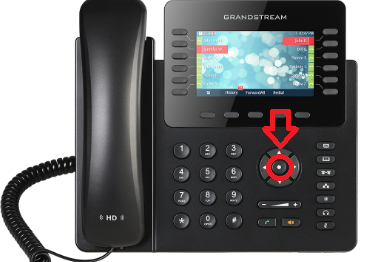
Press the Menu key (the center round button).

-
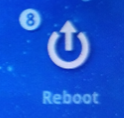
Select Reboot. (you may use arrows or just press the number # 8 on dial pad)

- When Highlighted press the Menu key (the center round button) to select it.
-
When asked to confirm, choose Yes.
-
The screen will go dark and the phone will restart. (it may appear as its not doing anything, but give it about 15 seconds)
Method B: Power-cycle the phone (unplug/replug)
If your phone uses Power over Ethernet (PoE)
-
Trace the network cable from the back of the phone to the wall jack or switch.
-
Unplug that network cable from the back of the phone.
-
Wait 10-15 seconds.
-
Plug the same cable back into the LAN port on the phone (not the PC pass-through port).
If your phone uses a power adapter (wall power)
-
Unplug the round power plug from the back of the phone or unplug the power brick from the wall.
-
Wait 10-15 seconds.
-
Plug it back in firmly to the phone and power outlet.
After the reboot
-
The screen will show the Grandstream logo, then your extension.
-
Line keys will light as the phone finishes registering.
-
You can place/receive calls once the line keys are solid and your name/extension is shown.
If the phone doesn’t come back up
-
Check the network cable is in the LAN port (not “PC”).
-
For power adapter: verify the power brick is firmly connected at both ends and the outlet has power.
-
Look for on-screen messages like “Not Registered”; if you see this, note it for support.
When to contact IT/Support
-
The phone shows “Not Registered” or can’t make/receive calls after reboot.
-
You see repeated reboots or error messages.
-
Your sidecar (EXT) or headset doesn’t power back on.
Provide your extension number, whether you used PoE or power adapter, and what you saw on the screen after the reboot.